
Our Solutions → Digital Twin for Maintenance
NRX Digital Twin for Maintenance
Visually identify and select spare parts, navigate your plant, and execute maintenance work faster with an illustrated, integrated digital twin.
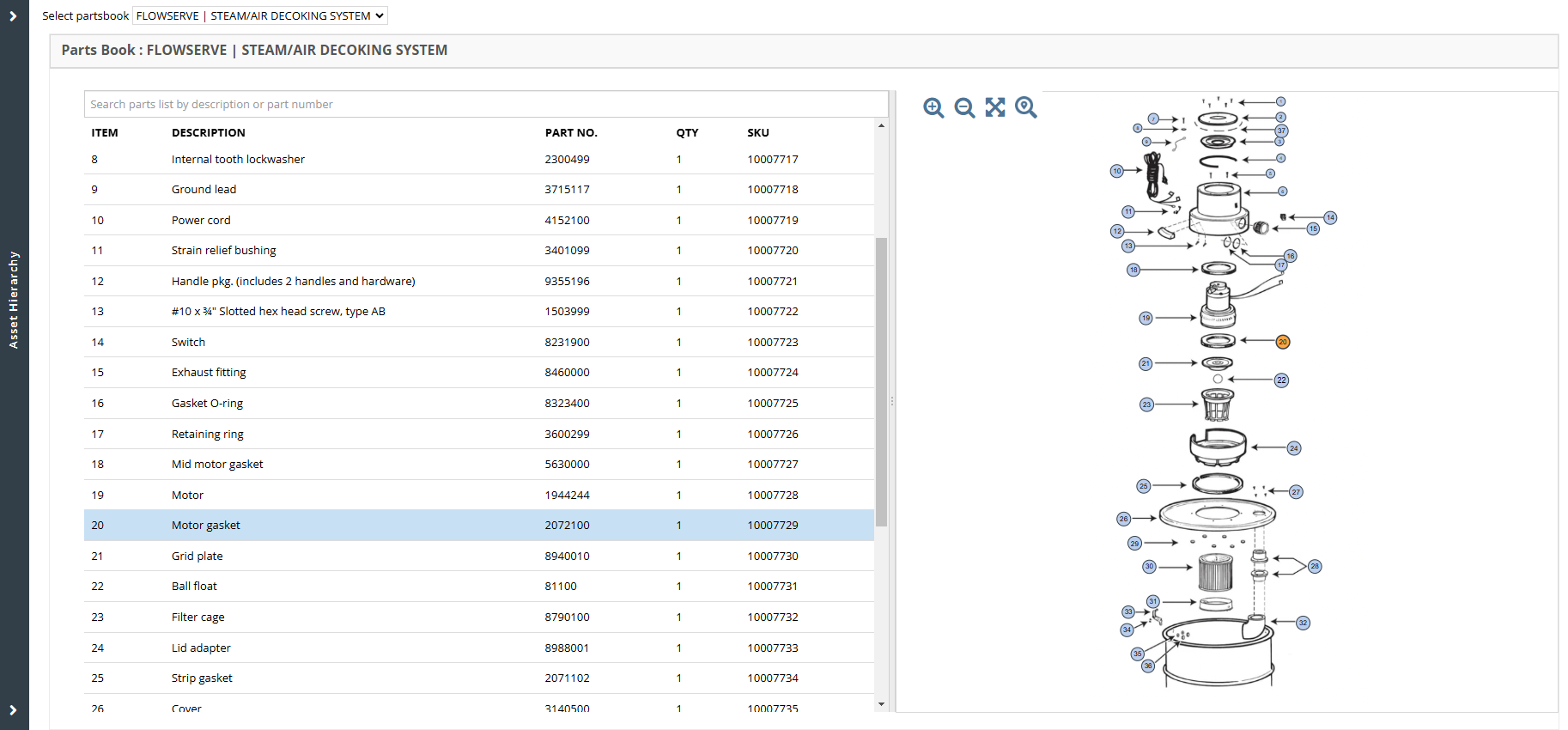
NRX Digital Twin is a visual asset, illustrated parts catalogue, and parts management solution that helps Maintenance, Reliability, and Supply Chain professionals visually identify and select the spare parts and vendor documentation they need to efficiently plan and execute maintenance work.
How Our Customers Use Our Digital Twin
- An electronic Digital Twin directly attached to equipment
- For Visual Parts Selection when missing parts for CMMS work orders and requisitions
- Recommendations to access vendor-recommended spare parts lists and other information sources
- As a Virtual Plant Navigator to navigate on the maps and P&ID drawings of a physical plant to find assets and equipment quickly and accurately
- The Digital Twin provides a 360-degree view of all their engineering asset and maintenance information in one easily navigated solution integrated with CMMS/EAM
Save search time
NRX Digital Twin helps our customers increase wrench time by at least 25% by making it easier and faster for maintenance operators to find information.
Better maintenance
NRX Digital Twin helps our customers achieve savings of at least 10% in ongoing maintenance and operations.
Illustrated Parts Catalog
Maintenance staff often require spare part information from a maintenance parts catalog when creating maintenance plans, maintenance task lists, or bills of materials. If the parts catalogue is missing or impaired, or stored at a different location, obtaining the correct information can be very time consuming. This results in wasted time, and can result in errors. In addition, it may lead to ordering or retaining the wrong inventory.
NRX Digital Twin allows our customers to digitalize and consolidate all asset-related documentation, including illustrated parts catalogs, photos, graphical maintenance manuals, P&IDs, and engineering drawings into a single, reliable source, and attach these documents directly to the applicable assets. Our customers load electronic parts catalogs and create hotpoints from drawings and diagrams to parts in a parts list, making it almost instantaneous to locate part numbers. NRX Digital Twin converts parts catalogs from LinkOne, Asset Navigator, and S1000D format automatically.
- Access illustrated parts catalogues and maintenance manuals for assets quickly
- Reduce errors in work orders: Maintenance personnel have the correct parts for work orders. More orders contain more detailed, accurate information, resulting in better maintenance reporting and planning
- Reduce Supply Chain Expenses: Reduce costs associated with unnecessary and expensive parts including sub-orders, chain shipping, and inefficient procurement
Visual Parts Selection for Work Orders
When creating a work order in an EAM or CMMS system, maintenance staff are often required to include representative part information for the work order performed. Without easy access to an electronic parts catalogue, locating the part information can be very time consuming and error-prone.
NRX Digital Twin integrates with all major EAM and CMMS systems to link directly from a work order to the Digital Twin for a piece of equipment. Users can visually select a part on an illustrated parts diagram, follow a blueprint title to the part in a parts list, and quickly retrieve the part or parts to be added to the work order or requisition. They specify quantities, and update the work order automatically, reducing errors when ordering parts.
- Reduce errors in work orders: Maintenance personnel have the correct parts for work orders. More orders contain more detailed, accurate information, resulting in better maintenance reporting and planning
- Reduce time to locate parts: Maintenance personnel spend less time looking for parts and information, and can more easily locate and select work order parts
- Reduce Supply Chain Expenses: Maintenance personnel are better connected with vendor details, product information, resulting in better maintenance reporting and planning
Build BOMs from Vendor-Recommended Spare Parts Lists
Maintenance staff in most intensive companies are challenged to build comprehensive maintenance data for assets, including complete and accurate bills of materials. When access to vendor documentation is limited for the documentation is missing, building a BOM is time consuming, and requires a significant amount of subject matter knowledge. Often, provider-submitted BOMs contain multiple assets, or multiple vendors are interchangeable parts. These parts often become duplicated in EAM or CMMS system, causing companies to unnecessarily stock for assets that have been decommissioned or removed.
NRX Digital Twin makes it easy to view the list of vendor-recommended spare parts for an asset in the visual parts catalog. AI is leveraged to recommend parts for BOMs based on multiple information sources. Maintenance staff can use the vendor parts list to quickly create a bill of materials. They can use intelligent SKU matching to match the recommended parts to parts in inventory, and add the SKUs to a BOM. They can also see lists of suggested BOMs based on similarities in assets, and quickly associate one or more with an asset.
- Build BOMs faster: Maintenance personnel can load BOMs quickly from vendor-recommended spare parts lists, and other information sources using our AI-powered solution
- Eliminate duplicate and obsolete spare parts: Maintenance personnel can visually identify the parts required, creating a more accurate list of required spare parts. Using Intelligent BOM matching, they can significantly reduce duplication in inventory and eliminate obsolete inventory
Virtual Plant Navigation
Maintenance staff in most intensive companies often need to locate equipment in remedied facilities, and may waste time physically searching for a piece of equipment in an unfamiliar area, or trying to locate equipment that has moved.
NRX Digital Twin helps users use digital 2D and 3D models for navigating through a large facility to locate a specific piece of equipment. Drill down from the plant or site level in the asset hierarchy to a particular asset, and see exactly where that asset resides on a 2D or 3D site model or on a digitalized P&ID. Conversely, click on a location in the digital twin, and find the location in the asset hierarchy.
- Find equipment and locations faster in a large facility: Maintenance personnel can quickly locate equipment or locations in a large facility, reducing the time spent looking for equipment. They can spend more time performing maintenance, and less time looking for equipment or locations
- Identify equipment in the asset hierarchy more quickly: Maintenance personnel can use digital twin models to locate the physical location of a piece of equipment in the digital twin, and quickly and easily find the data for that equipment in the asset hierarchy
- Understand where the equipment files in the process: Maintenance personnel can quickly understand the equipment files in the process from digitized P&IDs, facilitating shutdown, planning, scheduling, and efficient maintenance
IBM Maximo Asset Navigator Replacement
As an IBM software add-on and module operated by IBM, the effective withdrawal from market for Asset Navigator was April 30, 2021 with software support ending April 30, 2022. This means that all installations of Asset Navigator are officially out of support and cannot be upgraded beyond Maximo 7.5.
For IBM Maximo customers of Asset Navigator and other Asset Navigator functionality, NRX Digital Twin provides a Maximo-integrated, web-based alternative that has been embraced by the Maximo community. NRX Digital Twin, just like Asset Navigator, is tightly integrated with Maximo. NRX Digital Twin can be accessed from any of the following screens in Maximo:
- Assets
- Job Plans
- Work Orders
- Purchase Requisitions
- Purchase Orders
- Service Requests
- Quickly create and update content: NRX Digital Twin enables users to quickly upload, edit, organize, and manage records to create accurate spare parts for an asset or material
- Visual parts selection: Users can easily create material in the from-drawings, illustrated parts catalogues, and expanded parts diagrams to applicable parts lists, allowing maintenance staff to quickly locate the correct parts for their Maximo job plans, work orders, purchase requisitions, and service requests
- More accurate work orders: NRX Digital Twin helps Maximo customers produce better work orders, and with greater accuracy
- Migrate from Asset Navigator: Customers of our upgrade to NRX Digital Twin can easily automate content residing in the Asset Navigator Central Cluster, seamlessly migrating manuals, hot pieces, and documents
See NRX Digital Twin in action
Get a free demonstration and solution sheet for your team.